
會員登錄

軟體搜尋

您的位置: 網站首頁 >> 專業繪圖 >> 3D動畫CADCAMCAE >> 商品詳情
商品詳情
|
商品編號:CID5413 碟片數量:1片 銷售價格:80 瀏覽次數:12583 

【轉載TXT文檔】 |
您可能也喜歡:
CID12910--3D Space TopoLT 17.2.0.11 x64 二維和三維軟體 英文破解版
CID12911--ACDSee Photo Studio Home 2026 v29.0.0.3255 x64 數位資產管理和帶圖層的RAW編輯軟體 英文破解版
DVDP4920--Siemens Solid Edge 2026.2510 (3D設計、仿真、製造、資料管理軟體) 多國語言破解版(1DVD9+1DVD 此片售價380元)
CID12916--Ashampoo Photo Converter 3.0 x64 圖片管理軟體 英文破解版
CID13047--3Dsurvey 4.0.2 x64 土地資料測量處理軟體 英文破解版
商品描述
A7Soft ExamXML v5.00 視覺化XML辨視軟體 英文破解版
![]()
破解說明:請使用\Keygen 目錄下的keygen.EXE序號機產生序號
GBGFJH2OGS12DYARFLW0
軟體簡介:
A7Soft ExamXML v5.00 視覺化XML辨視軟體 英文破解版
官方網站:http://www.a7soft.com/examxml.html
程式簡介:
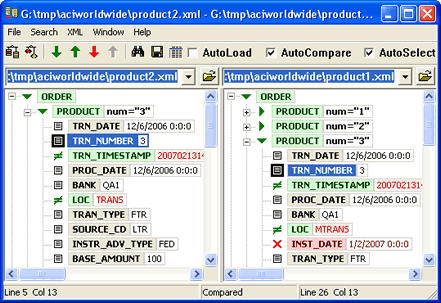
ExamXML是一款功能強大又簡單易用的視覺化XML辨視工具,採用聰慧的方法比對與整合XML檔。
ExamXML displays XML documents in a tree view, highlighting differences down to the level of elements,
words or attributes, so that you can view exactly which attributes and elements have been added,
modified or deleted. Red color means that the element has been removed, green means that the
element has been changed.
Easy navigation through the differences
ExamXML lets you visually browse through the differences using either the buttons with arrows on
the toolbar or hot keys. Red arrows mean browsing through deleted elements and green arrows mean
browsing through changed elements. If you want to browse differences on the current level without
expanding elements, press the Ctrl key and hold it pressed down while using navigation buttons.
This is especially useful when you need to glance differences within top-level elements without
rummaging in details.
破解說明:請使用\Keygen 目錄下的keygen.EXE序號機產生序號
GBGFJH2OGS12DYARFLW0
軟體簡介:
A7Soft ExamXML v5.00 視覺化XML辨視軟體 英文破解版
官方網站:http://www.a7soft.com/examxml.html
程式簡介:
ExamXML是一款功能強大又簡單易用的視覺化XML辨視工具,採用聰慧的方法比對與整合XML檔。
ExamXML displays XML documents in a tree view, highlighting differences down to the level of elements,
words or attributes, so that you can view exactly which attributes and elements have been added,
modified or deleted. Red color means that the element has been removed, green means that the
element has been changed.
Easy navigation through the differences
ExamXML lets you visually browse through the differences using either the buttons with arrows on
the toolbar or hot keys. Red arrows mean browsing through deleted elements and green arrows mean
browsing through changed elements. If you want to browse differences on the current level without
expanding elements, press the Ctrl key and hold it pressed down while using navigation buttons.
This is especially useful when you need to glance differences within top-level elements without
rummaging in details.