
會員登錄

軟體搜尋

您的位置: 網站首頁 >> 專業繪圖 >> 3D動畫CADCAMCAE >> 商品詳情
商品詳情
|
商品編號:CID5521 碟片數量:1片 銷售價格:200 瀏覽次數:12356 

【轉載TXT文檔】 |
您可能也喜歡:
DVD31505--CAMWorks 2026 SP0 x64 for Solid Edge 2025-2026 基於實體的參數化數控編程軟體 英文破解版(DVD一片裝)
DVD31506--CAMWorks ShopFloor 2025 SP5 x64 (CNC加工操作軟體) 英文破解版(DVD一片裝)
DVD31507--Chaos Vantage 3.1.1 Win X64 即時光線追蹤預覽軟體 英文破解版(DVD一片裝)
DVD31510--DAZ Studio Professional 4.24.0.4 x64 x86 專業的3D三維人物動畫製作軟體 英文破解版(DVD一片裝)
DVD31514--reaConverter Pro v8.0.173 圖像格式轉換軟體 繁體中文免安裝專業版(DVD一片裝)
商品描述
AdultPDF AP PDF To Image v4.5 可以將TIF JPG等轉換成PDFY軟體 英文破解版
![]()
XYZ軟體急先鋒(http://www.xyz168.net)
軟體簡介:
Ap.PDF.To.Image.Converter可以將TIF, JPG, GIF, PNG, BMP, PSD, WMF, EMF, PDF,
PCX, PIC 等圖例檔轉換成 PDF。
AP PDF to IMAGE Batch Converter is a useful pdf tool, the converter produces
fully functional IMAGE documents with text, pictures, graphics etc, using the
original PDF document formatting. It does not need any software support, such
as Adobe Acrobat, Acrobat Reader, etc.
AP PDF to IMAGE Batch Converter supports outputting result pages to be customized.
You can select sevral pages document to convert,and even at the discretion of
youself to convert pages document. Such as "1,2,3","2-100" etc, more information,
please refer to page range setting . It processes the documents one after another,
to ensure a output directory for each of them and placing all the finished files
of the document into its corresponding directory.
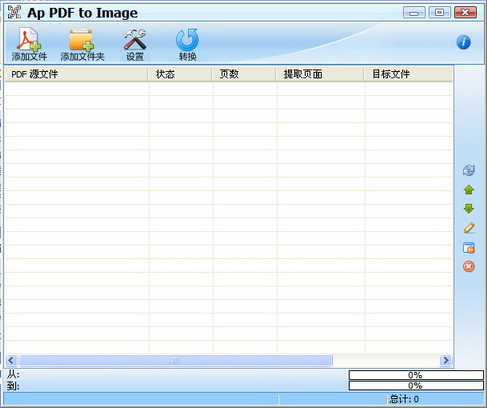
XYZ軟體急先鋒(http://www.xyz168.net)
軟體簡介:
Ap.PDF.To.Image.Converter可以將TIF, JPG, GIF, PNG, BMP, PSD, WMF, EMF, PDF,
PCX, PIC 等圖例檔轉換成 PDF。
AP PDF to IMAGE Batch Converter is a useful pdf tool, the converter produces
fully functional IMAGE documents with text, pictures, graphics etc, using the
original PDF document formatting. It does not need any software support, such
as Adobe Acrobat, Acrobat Reader, etc.
AP PDF to IMAGE Batch Converter supports outputting result pages to be customized.
You can select sevral pages document to convert,and even at the discretion of
youself to convert pages document. Such as "1,2,3","2-100" etc, more information,
please refer to page range setting . It processes the documents one after another,
to ensure a output directory for each of them and placing all the finished files
of the document into its corresponding directory.