
會員登錄

軟體搜尋

您的位置: 網站首頁 >> 專業知識教學 >> 電腦教學認證 >> 商品詳情
商品詳情
|
商品編號:DVD12961 碟片數量:1片 銷售價格:200 瀏覽次數:39438 

【轉載TXT文檔】 |
您可能也喜歡:
TIC0780-2--Digital Tutors Soft and Rigid Bodies in XSI 英文教學光碟正式版 (2CD)
TIC0233--DESKTOP IMAGES DISTINGUISHED BACKGROUNDS "高雅的背景" DVDRIP 英文版
TIC1636--DesignProVideo Lightroom 2 101 Core Lightroom 2 英文正式版(Lightroom 2 101 Lightroom 2核心教學)
CB0863-5--Learnkey XML for Developers Part 1 英文光碟正式版 (5片裝)
TIC0418--Gnomon Analog Training TRAINING Video-Dusso VOL I Dvdrip 英文教學光碟正式版 (Dusso主講遮罩繪畫教學)
商品描述
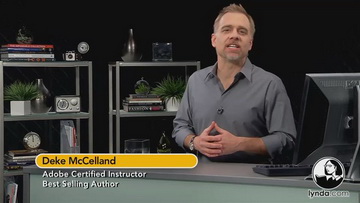
Lynda.com Illustrator CS5 One-on-One Fundamentals 教學影集(Illustrator 權威名師Deke McClelland講解 基礎篇 含練習檔)(DVD一片裝)
![]()
![]()
軟體簡介:
Lynda出品的 Illustrator CS5一對一教學. 該課程中Join Deke講解了基本工具的使用
刷光和創建工藝圖 創建和格式化文本. 使用鉛筆工具畫鉸接的路徑. 列印和導出到網路
上去等.........
Illustrator is the gold-standard vector graphics program that is deep and
complex. Fortunately, nobody knows the software like award-winning book and
video author Deke McClelland. Join Deke as he explores such indispensable
features as artboards, layers, line art, transformations, and the Pen tool.
Gain expertise with real-world projects that makes sense. Exercise files
accompany the course.
目錄:
Topics include:
- Creating great art using basic tools
- Brushing and building organic artwork
- Scaling and rotating path outlines
- Creating and formatting text
- Drawing articulated paths with the Pen tool
- Combining paths with Pathfinder operations
- Printing and exporting to the web

軟體簡介:
Lynda出品的 Illustrator CS5一對一教學. 該課程中Join Deke講解了基本工具的使用
刷光和創建工藝圖 創建和格式化文本. 使用鉛筆工具畫鉸接的路徑. 列印和導出到網路
上去等.........
Illustrator is the gold-standard vector graphics program that is deep and
complex. Fortunately, nobody knows the software like award-winning book and
video author Deke McClelland. Join Deke as he explores such indispensable
features as artboards, layers, line art, transformations, and the Pen tool.
Gain expertise with real-world projects that makes sense. Exercise files
accompany the course.
目錄:
Topics include:
- Creating great art using basic tools
- Brushing and building organic artwork
- Scaling and rotating path outlines
- Creating and formatting text
- Drawing articulated paths with the Pen tool
- Combining paths with Pathfinder operations
- Printing and exporting to the web